
Microsoft gave the task to Enterprise Strategy Group (ESG) to make Workload Performance Analysis of using Microsoft Windows Server 2012 with Hyper-V and SQL Server 2012. Findings of this report you can find in this article.
Tag: Windows 8/Server 2012
Windows Server 2012 Core Network Guide
The Windows Server 2012 Core Network Guide provides instructions for planning and deploying the core components required for a fully functioning network and a new Active Directory® domain in a new forest. Using this guide, you can deploy computers configured with the following server roles and technologies:
· The Active Directory Domain Services (AD DS) server role
· The Domain Name System (DNS) server role
· The Dynamic Host Configuration Protocol (DHCP) server role
· The Network Policy Server (NPS) role service of the Network Policy and Access Services server role
· The Web Server (IIS) server role
· TCP/IP connections on individual servers
This guide also serves as a foundation for companion guides that show you how to deploy additional technologies in Windows Server 2012.
Download the guide from here.
Brining Windows Azure Services to Windows Server for Hosting Service Providers
I have heard about these solutions from Microsoft but really didn’t had time to make some advance search but today accidently I’ve found the web site that stores information about them:
Microsoft is committed to delivering customers a consistent platform regardless of deployment location and calls this vision the Cloud OS. As part of this strategy, Microsoft is now enabling Hosting Service Providers to use Windows Server and System Center to deliver the same great experiences already found in Windows Azure. The first two of these finished services are high density website hosting and virtual machine provisioning and management. Hosting Service Providers enable these modules through the new Service Management API and optional portal, which will continue to add more services from Microsoft and 3rd party providers over time.
System Center Monitoring pack for NAP
Microsoft released SCOM Management Pack for Network Access Protection.
It is small management pack that after installing there is only one mp file:

It has only 4 classes:

Has dependencies only to basic management packs:
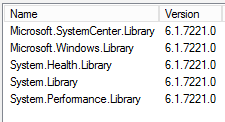
4 basic discoveries:

4 Unit Monitors:

2 Rules:

After importing the MP you will get two views – one for alerts and one for NPS servers state:

So as a summary a small management pack but useful if you have NAP services.
The MP can be imported on SCOM 2007 R2 or later.
You can download the mp from here.
Remember to read the documentation before importing.
Introducing SCVMM Service Templates and Datacenter Automation by Solution Accelerators Team
Update: As I wrote Microsoft is announcing two new Solution Accelerator beta programs for System Center products and now it is official at Microsoft SCVMM team blog.
Solution Accelerators Team in Microsoft is starting two new initiatives:
- System Center Virtual Machine Manager Service Templates – Solution Accelerators Team will probably create a site where SCVMM service templates will be published and supported by Microsoft. The first release will include templates for various Windows Server 2008 R2 and 2012 Roles – Domain Controller, DNS, DHCP, IIS and File Server. There will be also add-in for SCVMM that will be able to browse and download these service templates.
- Datacenter Automation for the cloud – From this initiative we will probably see scripts and runbooks for Orchestrator supported by Microsoft. The first solutions will be focused on SharePoint and Windows Server – Orchestrator Runbooks for quick SharePoint farm back-up and recovery scenario; Back up a Web application; Back up a service application; Trace logs; Checking Disk Space, CPU and RAM; Sharepoint WMI scan for perf/alerts; Scan for missing patches / WMI.
The two initiatives will start as beta programs on Microsoft Connect soon.
 Cloud Administrator in Azure World