System Center Monitoring pack for NAP

Microsoft released SCOM Management Pack for Network Access Protection.

It is small management pack that after installing there is only one mp file:

image

It has only 4 classes:

image

Has dependencies only to basic management packs:
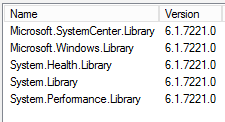
image

4 basic discoveries:

image

4 Unit Monitors:

image

2 Rules:

image

After importing the MP you will get two views – one for alerts and one for NPS servers state:

image

So as a summary a small management pack but useful if you have NAP services.

The MP can be imported on SCOM 2007 R2 or later.

You can download the mp from here.

Remember to read the documentation before importing.

Introducing SCVMM Service Templates and Datacenter Automation by Solution Accelerators Team


Update: As I wrote Microsoft is announcing two new Solution Accelerator beta programs for System Center products and now it is official at Microsoft SCVMM team blog.


Solution Accelerators Team in Microsoft is starting two new initiatives:

  • System Center Virtual Machine Manager Service Templates – Solution Accelerators Team will probably create a site where SCVMM service templates will be published and supported by Microsoft.  The first release will include templates for various Windows Server 2008 R2 and 2012 Roles – Domain Controller, DNS, DHCP, IIS and File Server. There will be also add-in for SCVMM that will be able to browse and download these service templates.
  • Datacenter Automation for the cloud  – From this initiative we will probably see scripts and runbooks for Orchestrator supported by Microsoft. The first solutions will be focused on SharePoint and Windows Server – Orchestrator Runbooks for quick SharePoint farm back-up and recovery scenario; Back up a Web application; Back up a service application; Trace logs; Checking Disk Space, CPU and RAM; Sharepoint WMI scan for perf/alerts; Scan for missing patches / WMI.

The two initiatives will start as beta programs on Microsoft Connect soon.

System Center 2012 Monitoring Pack for Microsoft Windows Server File & iSCSI Services 2012

Another Management Pack for Windows Server 2012. This Management Pack will monitor File and iSCSI Services in Windows Server 2012. Here are the changes:

  • DeDuplication – Stay current
  • FSRM

     • Support for clustered namespaces

     • Support for clustered replication group members

     • Agentless monitoring

     • More detailed product knowledge

     • Support for clustered replication group members

     • Agentless monitoring

  • iSCSI – iSCSI Target is built inbox first time in Server 2012. This is the first version integrated with File Server.
  • NFS – Stay current.
  • SMB – New


In order to configure the management pack read the manual.

The MP and the manual can be found here.

MVA: Windows Server 2012: Virtual Desktop Infrastructure

Courses from Microsoft Virtual Academy about Windows Server 2012  pop-up almost every week. Soon a new course will be released titled Windows Server 2012: Virtual Desktop Infrastructure. Here are the videos to that course:

System Center 2012 Service Pack 1 Beta Integration Pack for FTP

New integration pack for System Center Orchestrator is being cooked. With this IP you will be able to execute activities from Orchestrator for FTP service in Windows Server 2008 R2 and 2012. The following activities are included in the IP:

  • Create Folder- the Create Folder activity is used in a runbook to create a folder on a FTP server.
  • Delete File- the Delete File activity is used in a runbook to delete a file on a FTP server.
  • Delete Folder- the Delete Folder activity is used in a runbook to delete a folder on a FTP server.
  • Download File- The Download File activity is used in a runbook to download a file from a FTP server.
  • List Folders/Files- the List Folders/Files activity is used in a runbook to list the folders and files in the specified folder path.
  • Rename File/Folder- the Rename File/Folder activity is used in a runbook to rename a file or folder on a FTP server.
  • Resume File Download- the Resume File Download activity is used in a runbook to resume a file download. This activity is only compatible with a FTP configuration.
  • Synchronize Folder/File- the Synchronize Folder/File activity is used in a runbook to perform a one way synchronization of a folder/File.
  • Upload File- The Upload File activity is used in a runbook to upload files to a FTP server.


You can download the IP from here.

