First install OpsMgr Agent Before Installing OpsMgr or SCSM Console

I’ve ran into an issue where I couldn’t install SCOM 2012 SP1 agent on a server. I was getting the following error:

The System Center 2012 – Operations Manager agent cannot be installed on a computer on which the Operations Manager management server, gateway server, Operations console, operational database, web console, System Center Essentials, or System Center Service Manager is already installed.

The server had OpsMgr and SCSM consoles installed because it was Orchestrator server. To resolve my issue I had to remove both consoles in order to be able to install the OpsMgr agent. I’ve removed both consoles installed the agent and than installed the consoles again.

I cannot remember having this issue with SCOM 2007 R2 but definitely had it with MOM agent 2005 and MOM 2005 Consoles. It will be better if such dependencies are removed in System Center vNext.
Applying CU1 to OpsMgr 2012 SP1 with Kevin Holman

Even though updating System Center 2012 Operations Manager has gotten a whole lot easier it is still better the guides from Kevin Holman. Check the guide for CU1 for SP1 here.

New MP: System Center Management Pack for Windows Server DNS

No I am not wrong this is actually a new MP not just an updated version of the old one. You can install it side by side with the old one until you feel comfortable of using only the new one and this is stated in a Note on the download page:

This Management Pack is intended to completely replace the functionality of the previous DNS Management Pack, and as such it is not backwards compatible with them. The old and new management packs can live side-by-side, so you can uninstall the old MP’s if/when you are comfortable with the new Management Pack.

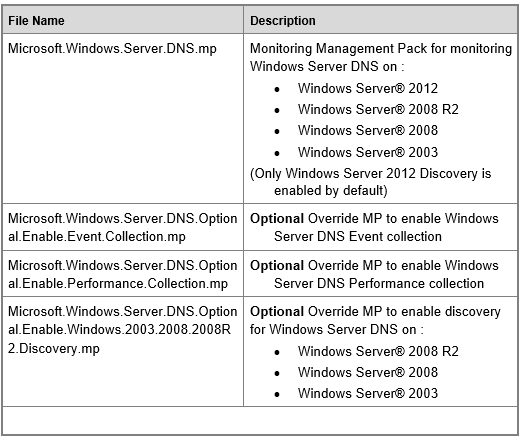
If you open the guide you can find even more information. This MP is structured in a different way which might be the new way of how management packs will be released:

image


I like this new structure because it gives you the possibility to enable more advanced monitoring by adding another MP that contains all overrides.

Also the announcement for this MP comes in blog post which is great. So far we noticed some new MP downloads on the Microsoft site and after a few days you may or may not see short announcement about new version of MP. But this time is different and in the announcement it is stated that the new MP was tested by the XBOX Live team which will be equivalent of beta testing. May be it is a good idea to beta MPs to be published on Microsoft Connect in order not only TAP customers and internal Microsoft teams to be able to provide feedback.

You can find the announcement about DNS MP here.

Download is located here.

As usual remember to read the guide first before deploying.

More information on the MP here.

Another reminder that all 2007 R2 and 2012 OpsMgr MPs are located here and I have a nice script to download them all in bulk here.

New MP: System Center Management Pack for Windows Server DNS

No I am not wrong this is actually a new MP not just an updated version of the old one. You can install it side by side with the old one until you feel comfortable of using only the new one and this is stated in a Note on the download page:

This Management Pack is intended to completely replace the functionality of the previous DNS Management Pack, and as such it is not backwards compatible with them. The old and new management packs can live side-by-side, so you can uninstall the old MP’s if/when you are comfortable with the new Management Pack.

If you open the guide you can find even more information. This MP is structured in a different way which might be the new way of how management packs will be released:

image


I like this new structure because it gives you the possibility to enable more advanced monitoring by adding another MP that contains all overrides.

Also the announcement for this MP comes in blog post which is great. So far we noticed some new MP downloads on the Microsoft site and after a few days you may or may not see short announcement about new version of MP. But this time is different and in the announcement it is stated that the new MP was tested by the XBOX Live team which will be equivalent of beta testing. May be it is a good idea to beta MPs to be published on Microsoft Connect in order not only TAP customers and internal Microsoft teams to be able to provide feedback.

You can find the announcement about DNS MP here.

Download is located here.

As usual remember to read the guide first before deploying.

Another reminder that all 2007 R2 and 2012 OpsMgr MPs are located here and I have a nice script to download them all in bulk here.

Global Service Monitor Officially Available

After a months of testing Global Service Monitor for OpsMgr is now officially available. Service is free for System Center customers with Software Assurance. Check the full announcement.