Azure Bicep Snapshots is a new preview feature introduced in v0.36.1 release. The feature allows you to generate the definition of a resource as it appears in ARM or in the Azure Portal for that particular resource when you click on the JSON view option, producing a JSON file as the result. Once you have that JSON file you can execute the snapshot command again to get results in what-if format. All this is done locally without doing an actual deployment against Azure. This means you can see how changes either in code or in the input impact your end results without having to deploy resources or make sure any referenced resources exist. This blog post will focus on showing you the capabilities of Bicep Snapshots in a complex real-world module and its bicep parameters configuration.
Tag: Log Analytics
Do not use Azure Front Door metric OriginHealthPercentage in Log Analytics
Azure Front Door is a global, scalable service that acts as a content delivery network (CDN) and application load balancer to improve application performance and availability. The way you expose application on Azure FD is by creating origins. For each origin you have to add one or more origins. When configuring the origin you have the option to configure health probe. The health probe makes sure the origins are up. If an origin is not up it will traffic will not be sent to it. The results from the health probes is visible via OriginHealthPercentage metric. Now let’s have a closer look to metric OriginHealthPercentage as the results from it might be a little bit confusing, especially when you send the metric to Log Analytics workspace and viewed there.
Monitoring canceled Azure Subscriptions
Azure Subscription cannot be just deleted. They go trough different states. Although you might have taken all necessary to secure your Azure tenant sometimes mistakes happen or your environment might be compromised by bad actors. The first step of removing Azure Subscription is to cancel it. That is critical action that you may want to monitor although you should have in place other ways to monitor resources that will signal that they are not available. In any case additional alert that this action was done could be useful information to be alerted upon. In this blog posts we will take a look how we can do that by using Azure Monitor. The deployment of the Azure Monitor resource will be done via Azure Bicep.
Using Optional parameter if not configured in Azure Monitor workbooks with KQL query
Azure Monitor workbooks are great way to visualize Azure data for monitoring and analysis. Although there is a good documentation on how to built them I would say that examples for more advanced scenarios are lacking in there. Recently I was asked a question about such scenario: “How do I set KQL query in a way that the filter for optional parameter in Azure Monitor workbook is not applied if value is not provided for that parameter?”.
Enable Defender for Cloud Auto provisioning agents via Bicep
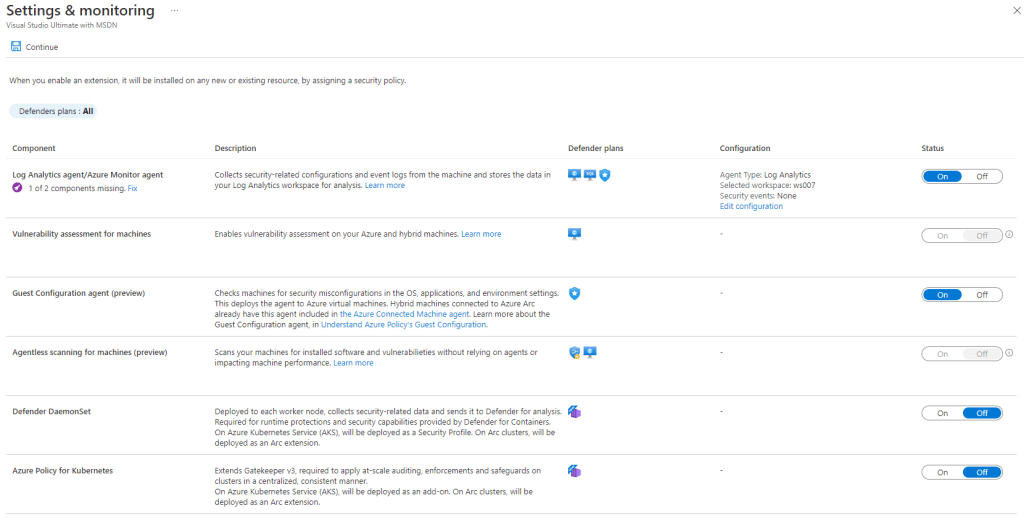
Often I see questions around how I can the auto provisioning agents capabilities (now renamed to Settings & monitoring) in Defender for Cloud via API.