
After introducing MCP servers. within Azure API Management and me blogging about it, now we have A2A API support. This makes APIM a very good choice for protecting, accelerating and observing your AI apps. Obviously I was tempted to find out how this new API type can be deployed via Bicep as proper documentation is lacking.
To do proper testing I even deployed A2A agent. I would recommend using Semantic Kernel A2A Travel Agent if you do not have already such and want to test it. Note that this new functionality is available only on v2 tiers so I would suggest plan migration if you are still on v1 tiers. Initially while trying to test this functionality via the Azure Portal I have started to hit error “This A2A import feature isn’t available in your region yet, but it’s coming soon.” when I was trying to create the API. From the portal when you try to create API and the A2A agent is not reachable it allows you to enter the information on your own. And there Agent ID is not required but it is required on API level of the resource. And when that property is not filled the Portal throws this weird error that has nothing to do with the issue.
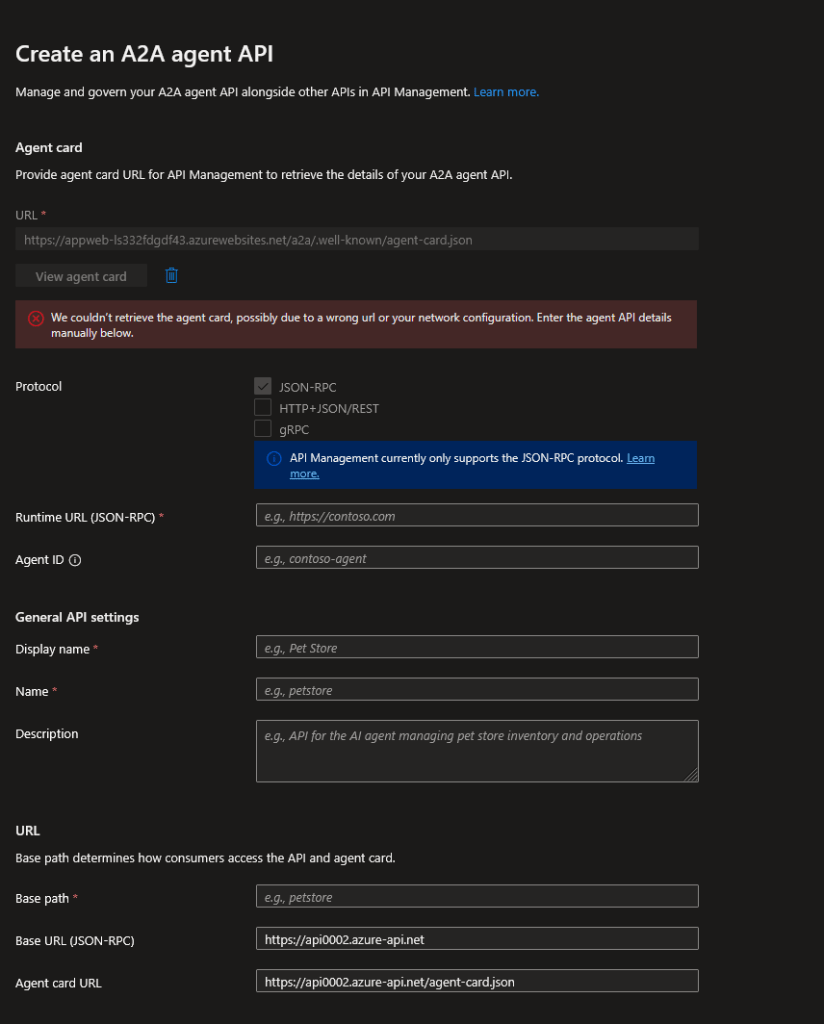
Needless to say that it took some time until I have found this issue and I was able to find out how to deploy the A2A API type with Bicep as well. As usually I try to provide my examples as close as possible to production deployment so I have user defined data types for the input:
@export()
type a2aApi = {
  @description('The name of the A2A API.')
  @minLength(1)
  @maxLength(256)
  name: string
  @description('The display name of the A2A API. Default: same as name.')
  @minLength(1)
  @maxLength(300)
  displayName: string?
  @description('The description of the A2A API.')
  description: string?
  @description('''The unique identifier of the agent.
    API Management will log the provided value in the gen_ai.agent.id attribute of OpenTelemetry traces for consistency with agent execution traces.''')
  agentId: string
  @description('The agent name. Default: null.')
  agentName: string?
  @description('The agent management portal URL. Default: null.')
  agentManagementPortalUrl: string?
  @description('The agent provider name. Default: null.')
  agentProviderName: string?
  @description('Agent card URL.')
  agentCardBackendUrl: string
  @description('Agent card path. Default: the last segment of the agentCardBackendUrl.')
  agentCardPath: string?
  @description('The backend (runtime) URL (JSON-RPC).')
  jsonRpcBackendUrl: string
  @description('The JSON-RPC path. Default: "/".')
  jsonRpcPath: string?
  @description('The API base path.')
  path: string
}
Note that agentName, agentManagementPortalUrl and agentProviderName can be specified but it is not clear how they currently can be used within APIM. Now let’s look at the code for deployment as well:
import * as a2aApiType from './types.bicep'

@description('The name of the API Management service instance.')
param apiManagementServiceName string

@description('The A2A API configuration.')
param a2aApi a2aApiType.a2aApi

resource apiManagementService 'Microsoft.ApiManagement/service@2025-03-01-preview' existing = {
  name: apiManagementServiceName
}

resource a2aApiResource 'Microsoft.ApiManagement/service/apis@2025-03-01-preview' = {
  name: a2aApi.name
  parent: apiManagementService
  properties: {
    displayName: a2aApi.?displayName ?? a2aApi.name
    description: a2aApi.?description ?? null
    type: 'a2a'
    apiType: 'a2a'
    isAgent: true
    agent: {
      id: a2aApi.agentId
      name: a2aApi.?agentName ?? null
      managementPortalUrl: a2aApi.?agentManagementPortalUrl ?? null
      providerName: a2aApi.?agentProviderName ?? null
    }
    a2aProperties: {
      agentCardPath: a2aApi.?agentCardPath ?? '/${last(split(a2aApi.agentCardBackendUrl, '/'))}'
      agentCardBackendUrl: a2aApi.agentCardBackendUrl
    }
    jsonRpcProperties: {
      path: a2aApi.?jsonRpcPath ?? '/'
      backendUrl: a2aApi.jsonRpcBackendUrl
    }
    protocols: [
      'http'
      'https'
    ]
    path: a2aApi.path
    mcpProperties: null
    backendId: null
    format: null
    apiVersion: null
    apiVersionSet: null
    apiVersionSetId: null
    apiVersionDescription: null
    apiRevisionDescription: null
    authenticationSettings: {
      oAuth2: null
      openid: null
      returnProtectedResourceMetadata: false
    }
    contact: null
    license: null
    serviceUrl: null
    sourceApiId: null
    subscriptionKeyParameterNames: {
      header: 'Ocp-Apim-Subscription-Key'
      query: 'subscription-key'
    }
    subscriptionRequired: true
    termsOfServiceUrl: null
    translateRequiredQueryParameters: null
    value: null
    wsdlSelector: null
  }
}
If you open the code in VSCode and Bicep extension installed you will notice that there are a lot of properties that are not according to the schema of the resource and even that a2a is not one of the possible inputs for type and apiType properties. As this is preview feature at the time of writing this blog that is most likely the reason for these issues although I have seen other APIs for other resources implementing preview features properties along with the preview release. As you can see there are specific properties for A2A API type. Note that currently A2A API only supports JSON-RPC protocol. From the portal it seems that at later point HTTP+JSON/REST and gRPC will also be supported in the future. That is why you see also JSON-RPC specific properties as well. Once you have A2A API deployed you can configure policies for it. On GitHub where the examples are also available you will also see a simple minimum bicep parameters file. Of course the URL of the web app is mock-up.
I hope this was useful content!
 Cloud Administrator in Azure World