
Azure Policy checks Azure resources and operations by matching their properties against defined business rules. It helps to enforce organizational standards and to assess compliance at-scale. Azure Policy is commonly used to enforce governance across Azure, ensuring consistency, regulatory compliance, security controls, cost management, and operational standards. Unfortunately, Azure Policy has its secrets; it has some limitations that are either not documented or the documentation is not so easy to find. With this blog post, I am not trying to bash on Azure Policy as I love the service and I think its architecture is very good, but due to the way some Azure APIs are written it can limit what Azure Policy can do.
A few months ago I was made aware about two policies [Preview]: Multi-User Authorization (MUA) must be enabled for Recovery Services Vaults and [Preview]: Multi-User Authorization (MUA) must be enabled for Backup Vaults. As you can see, these are preview policies. I am no stranger to applying or deploying preview features or policies. From my experience, there is a difference between one preview feature and another preview feature. I have seen some previews being quite stable and only might need some additional options added and others that are barely usable. The state of the preview does not depend much on which service provides it, so it is up to evaluate the state and determine if that state is usable for you. It was reported to me that a custom policy definition was created based on those two policies, but it was not working properly. One of the main differences that was done in the custom policy when compared to the built-ins was that they have added Deny policy effect, and they were using that. The problem that was reported to me is that the Bicep modules for deploying the resources in the rule of the custom definitions were failing. They were failing due to those properties used by the aliases in the custom policy were not being applied. They were even failing when the vaults were configured with MUA. So clearly I have identified that as a bug either in something of the resource providers itself or Azure Policy. Due to that, we have logged official Azure support case. Initially, they tried to convince us that this is by design and those aliases do not work with Deny effect. I could agree with that statement but that statement was not based on any official documentation or root cause analysis. At the end, we have accepted that this is by design but with the requirement that such limitations be documented somewhere officially. One of the reasons to write this blog post is because support has lied to me and I do not see anywhere this documented. If I am mistaken, I will apologize but at this moment I did not find any official documentation about this “feature by design”. Before providing information where you can find Azure Policy limitations about different resources and aliases, I want to first provide my explanation why those aliases do not work with Deny effect. My assumption is that any alias works with every standard policy effect like – audit, deny, auditIfNotExists or deployIfNotExists. In this list I am excluding any other policy effects that are for specific cases. I am also excluding modify effect as that one you can easily find for which alias the effect works. In short, there is official Azure Policy API to list the available aliases and if they are supported by modify effect. My preference would be that the API would show also if Deny effect is supported by the alias and I have suggested that but there was no interest in doing that. Now back to the topic of why these aliases are not supported with Deny effect. The reason behind that is that MUA for both of these resources is configured by applying a child resource for these vault resources. Those child resources are Microsoft.DataProtection backupVaults/backupResourceGuardProxies and Microsoft.RecoveryServices/vaults/backupResourceGuardProxies. That means you first need to deploy the parent resource in order to deploy the child one. In this case the aliases are just read-only properties on the parent resources that show true or false depending if the child resources are configured. That is why the Deny effect does not work. Note that even if you use such policy for those aliases with Deny effect, if you supply the actual properties in the deployment, the vault will not throw an error that they are read-only properties and the deployment will pass as successful for the policy basically bypassing it without such protection being configured. That is another reason why you should not use Deny effect for those aliases as it allows bypassing the policies besides just not working. From my perspective, this approach is not good as it means that you cannot configure a policy where a vault is MUA enabled by default and have a policy that denies any creation of vaults that are not MUA enabled. So with the current state, you can only audit if there are such vaults. If you want to strictly control this, you will have to regularly check or have an alert to monitor for non-compliant vaults and take remediation actions. I really hope that at some point in the future, for that API to be implemented directly on the parent resource so you can achieve better compliance. Usually such kind of limitations for any alias or resource provider are documented. When you open the Azure Policy documentation in the troubleshoot section you can find external link to those known issues:
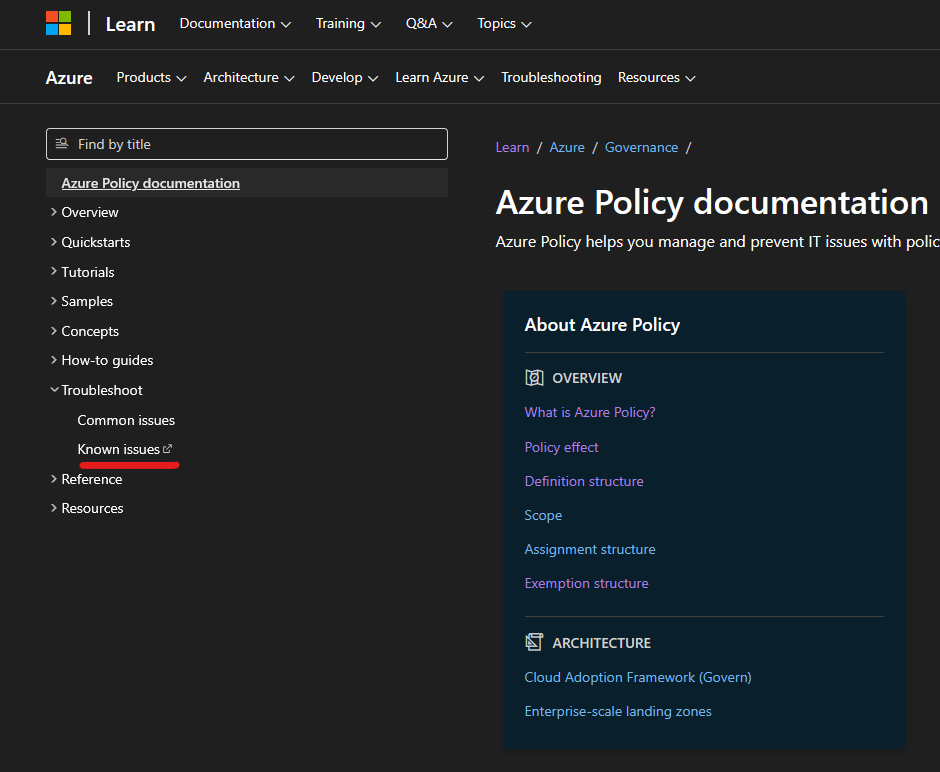
That link will lead you to the main readme.md file for Azure Policy GitHub repository. My experience shows me that a lot of engineers do not find that link very easily. I do not have the slightest idea why all this information wouldn’t be directly in the Learn docs instead of being hosted on GitHub repository. From my perspective, it is like Azure Policy is trying to hide those known issues. In Learn docs, it will be easier to find that information and its structure could be laid out better. I also would encourage Microsoft to work on those known issues and slowly try to fix them over time as it seems the list is getting bigger and the documentation is being neglected. I would also encourage if you find such feedback useful to also give it when you have a chance to speak with Microsoft employees representing the service.
I hope you have found this post helpful and useful to understand better Azure Policy.
 Cloud Administrator in Azure World
One thought on “Azure Policy Little Secrets”