
Azure APIM is essential feature in building AI applications. Being part of that it is important to protect your APIs and couple years ago Azure has provided such capability in Defender for Cloud called Defender for APIs. Previously I have demonstrated how to configure Defender for Cloud plans in Enable Defender for Cloud Auto provisioning agents via Bicep. For Defender for APIs plan it is the same resource type Microsoft.Security/pricings but the name of the resource is ‘Api’. Additionally, you will set pricingTier to Standard to enable it and subPlan to P1, P2, P3, P4 or P5. As this is the initial configuration only in this blog post we will look at what to do next.
When you try to enable Defender for APIs plan via Azure Portal you will see that is only the first step and there is Acton Required warning.
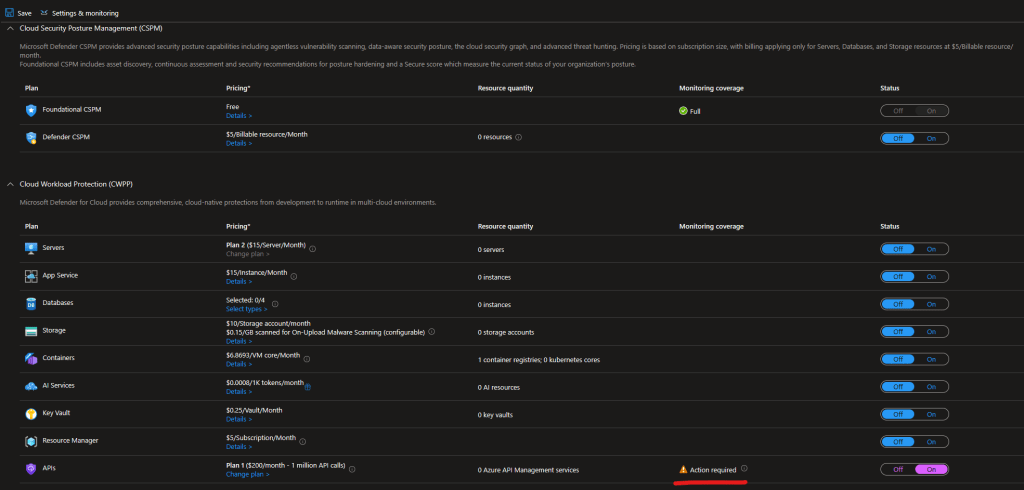
This Action Required leads to Protect your APIs with Defender for APIs Microsoft Learn doc. As the document describes you will have to individually enable Defender for APIs on the APIs that you want to protect. All the instructions listed on the page require you to use the Azure Portal and specifically to do it via Defender for Cloud recommendation. This means you will have to wait for this recommendation to be generated and even every time a new API is added to be discovered by the recommendation so it can be listed for remediation in order to onboard it to Defender for APIs. That kind of instructions are not something that are suitable for management at scale. I have tracked down what the remediation does and found out the Bicep resource we need to apply to do the same. I have never understood why it is so hard to document how this is done via tools like Bicep and force your customers to do things manually. Unfortunately this is pattern I see often. Anyway here is the Bicep template you can use to onboard API to Defender for APIs.
@description('The API Management service name.')
param apiManagementServiceName string
@description('The API name to onboard to Defender for APIs.')
param apiName string

resource apiManagementService 'Microsoft.ApiManagement/service@2024-06-01-preview' existing = {
  name: apiManagementServiceName
}
resource api 'Microsoft.ApiManagement/service/apis@2024-06-01-preview' existing = {
  name: apiName
  parent: apiManagementService
}

resource defenderForAPIs 'Microsoft.Security/apiCollections@2023-11-15' = {
  name: api.name
  scope: apiManagementService
}
Note that the API is extension resource scoped to the API Management service but the name of the resource must be the same as the API you want to onboard to Defender for APIs. To offboard you will have to delete Microsoft.Security/apiCollections resource. The example you can find at GitHub as well.
I hope this was another helpful information for you that you can use in your Bicep IaC and avoid doing manual configurations via Azure Portal.
 Cloud Administrator in Azure World
One thought on “Enabling Defender for APIs on Azure APIM APIs with Azure Bicep”