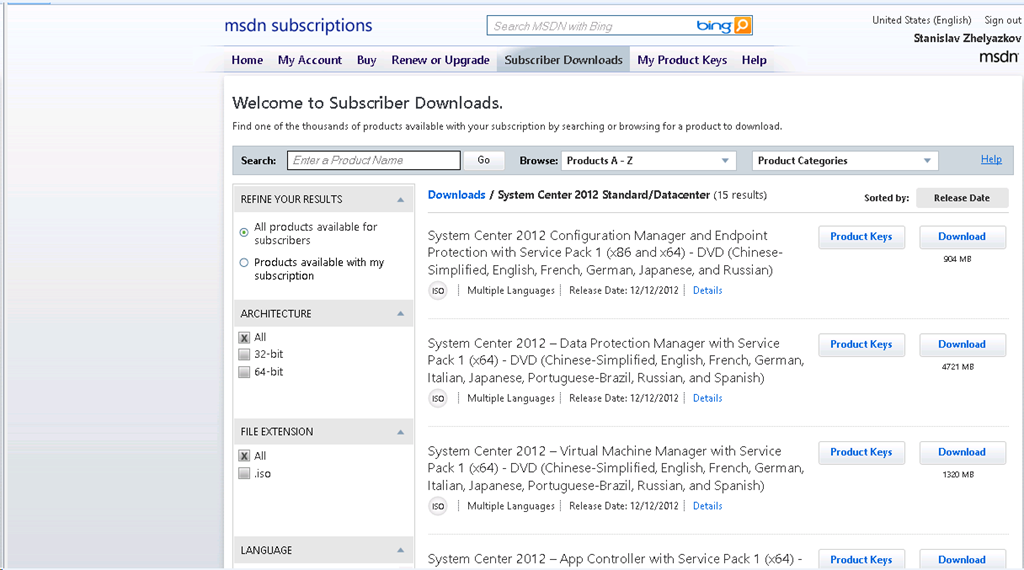
The long waited Service Pack 1 of System Center 2012 has reached RTM and it is now available for download on MSDN. It seems the rumors were true. This is a Christmas gift from Microsoft
.
Tag: System Center Data Protection Manager
System Center 2012 Integration Guides
With System Center 2012 the different products of the family became components. This was not just changing of words. This change has the goal to tip that all components come in one license and that their integration is way better compared to the previous versions. To help us leverage that integration community project created Integration guides for System Center 2012 components:
The purpose of the Integration Guide is to provide an overview of each System Center component in its role as a programmable platform to be leveraged for the Microsoft Private Cloud. It is intended to provide an abstraction layer that guides partners and customers on their decision process for methods to build automated solutions across System Center components and between System Center and other systems.
Update Rollup 3 for System Center 2012 is available
It seems Microsoft is working hard to provide support for System Center 2012. Even SP1 for System Center 2012 is a couple of months away we are still getting updates for System Center 2012 RTM. Update rollup 3 fixes the following issues:
Update Rollup 3 for System Center Data Protection Manager 2012 (KB2751230)
Issue 1
After you upgrade System Center Data Protection Manager 2010 to System Center Data Protection Manager 2012, the tape management report does not display overdue tapes.
Issue 2
System Center Data Protection Manager 2012 Client Protection does not scale to the limits that are expected.
Issue 3
When you try to specify a client computer name in the DPMServerName attribute by using Windows PowerShell, Windows PowerShell crashes.
Issue 4
When the name of a Microsoft SharePoint site collection contains a space, and you perform a SharePoint item-level recovery operation in System Center Data Protection Manager 2012, the operation fails.
Issue 5
After you rename a SharePoint site in System Center Data Protection Manager 2012, you cannot restore the site.
Issue 6
The SharePoint Recovery Point Status Report displays incorrect data in System Center Data Protection Manager 2012.
Issue 7
A bare metal recovery fails in certain situations.Update Rollup 3 for System Center Operations Manager 2012 (KB2750631)
Issue 1
When you use the 32-bit version of Windows Internet Explorer to start a web console, the Microsoft.EnterpriseManagement.Presentation.Controls.SpeedometerGaugeUIController controller does not work correctly.
Issue 2
When you run a Windows PowerShell cmdlet, you receive the following error message:Get-BPAModel is not recognized as the name of a cmdlet.
Issue 3
When you try to change a URL in the "web application availability monitoring" template instance, the change is not applied.Update Rollup 3 for System Center Service Manager 2012 (KB2750615)
Issue 1
When you open or close the Incident form in the System Center Service Manager 2012 console, a memory leak occurs.
Issue 2
When form control objects are rooted in the Garbage-Collected (GC) Heap, the System Center Service Manager 2012 console crashes, and you receive an OutOfMemoryException exception.
Issue 3
After you change the SharePoint site language to Turkish in the System Center Service Manager 2012 portal, the display strings are displayed in English unexpectedly.
Issue 4
When you open the System Center Service Manager 2012 console by using a Citrix application, and then you open the Incident form, you experience slow performance.
More information and download links are located here.
Several new downloads after System Center 2012 SP1 beta was released
A couple of hours after beta of SP1 for System Center 2012 was released some additional related downloads were released:
- Help Documentation for Using Windows Azure Online Backup with System Center 2012 SP1 – Data Protection Manager – This Document will describe how to deploy and use System Center 2012 SP1 Data Protection Manager (DPM) to store backup data in the cloud using the Windows Azure Online Backup service
- System Center 2012 SP1 Configuration Manager Package Conversion Manager 2.0 Beta – Microsoft System Center 2012 Configuration Manager SP1 Package Conversion Manager v2.0 (PCM) is a feature pack download that lets you to convert Configuration Manager 2007 packages into System Center 2012 Configuration Manager SP1 applications.
- Microsoft System Center 2012 Service Pack 1 Beta Configuration Manager – Clients for Additional Operating Systems – Microsoft System Center 2012 Configuration Manager SP1 Beta supports the management of Linux and UNIX servers. The clients for Linux and UNIX extends the scope of your Configuration Manager environment to collect inventory, deploy software, and run reports about Linux and UNIX servers in your enterprise. The client operates as a workgroup client that is managed by Configuration Manager.
- System Center 2012 Orchestrator Integration Pack for VMware vSphere Beta – The Integration Pack for VMware vSphere is an add-on for System Center 2012 Orchestrator that enables you to connect System Center Orchestrator to your VMware vSphere server to automate actions in VMware vSphere to enable full management of the virtualized computing infrastructure.
- System Center 2012 Service Pack 1 Beta Integration Pack for VMware vSphere – The Integration Pack for VMware vSphere is an add-on for System Center 2012 SP1 Beta- Orchestrator that enables you to connect System Center Orchestrator to your VMware vSphere server to automate actions in VMware vSphere to enable full management of the virtualized computing infrastructure.
- System Center 2012 Service Pack 1 Beta Integration Pack for HP Service Manager Beta – The Integration Pack for HP Service Manager is an add-on for System Center 2012 SP1 Beta- Orchestrator that enables you to retrieve, create, update and monitor tickets in HP Service Manager.
- System Center 2012 Service Pack 1 Beta Integration Pack for HP Operations Manager Beta – The Integration Pack for HP Operations Manager is an add-on for System Center 2012 SP1 Beta- Orchestrator that enables you to automate the consolidation and correlation of fault and performance events across you entire physical and virtual IT infrastructure.
System Center 2012 SP1 BETA is now available
Great news we now have beta version that we can test and provide feedback. From what I hear is that RTM could be available before end of the year or early next year. The downloads are located here. Some of the new features are:
- Virtual Machine Manager
- Improved Support for Network Virtualization
- Extend the VMM console with Add-ins
- Support for Windows Standards-Based Storage Management Service, thin provisioning of logical units and discovery of SAS storage
- Ability to convert VHD to VHDX, use VHDX as base Operating System image
- Configuration Manager
- Deployment and management of Windows 8 and Windows Server 2012
- Distribution point for Windows Azure to help reduce infrastructure costs
- Automation of administrative tasks through PowerShell support
- Management of Mac OS X clients and Linux and UNIX servers
- Real-time administrative actions for Endpoint Protection related tasks
- Data Protection Manager
- Improved backup performance of Hyper-V over CSV 2.0
- Protection for Hyper-V over remote SMB share
- Protection for Windows Server 2012 de-duplicated volumes
- Uninterrupted protection for VM live migration
- App Controller
- Service Provider Foundation API to create and operate Virtual Machines
- Support for Azure VM; migrate VHDs from VMM to Windows Azure, manage from on-premise System Center
- Operations Manager
- Support for IIS 8
- Monitoring of WCF, MVC and .NET NT services
- Azure SDK support
- Orchestrator
- Support for Integration Packs, including 3rd party
- Manage VMM self-service User Roles
- Manage multiple VMM ‘stamps’ (scale units), aggregate results from multiple stamps
- Integration with App Controller to consume Hosted clouds
- Service Manager
- Apply price sheets to VMM clouds
- Create chargeback reports
- Pivot by cost center, VMM clouds, Pricesheets
- Server App-V
- Support for applications that create scheduled tasks during packaging
- Create virtual application packages from applications installed remotely on native server