
This component add-on represents Management Pack for monitoring Java Enterprise applications and the Sizing Help file for SCOM 2012. I couldn’t find what exactly has been updated as none of the documents seems to have new version but the publish date was changed to 21.03.2013. Download them from here.
Tag: MP
New Version: Insight Control for Microsoft System Center 7.2
Insight Control for Microsoft System Center is a package of integration kits that aim to integrate HP Hardware and Software with Microsoft System Center. Here is the description of these integration kits taken from the HP site:
System Center Operations Manager (SCOM) support:
- The HP ProLiant and BladeSystem Management Packs expose the native capabilities of ProLiant and BladeSystem servers and enclosures to help prevent problems from occurring by proactively monitoring and managing hardware health and intelligently responding to hardware events on servers running Windows.
- The HP ProLiant Agentless Management Pack manages the health of ProLiant Gen8 servers without the need for loading OS-based SNMP agents or WBEM providers. It can also be used to monitor the health of servers that do not have an OS yet loaded, as well as ProLiant Gen8 servers running any operating system that has a supported Agentless Monitoring Service (such as VMware ESXi).
- The HP ProLiant Linux and VMware Management Packs provide the ability to monitor hardware health and configuration, as well as to receive HP hardware alerts, on ProLiant servers running Linux and VMware ESX.
- Supports SCOM 2007 and SCOM 2012 (including SP1) for all HP SCOM management packs.
System Center Virtual Machine Manager (SCVMM) support:
- The HP Performance Resource Optimization (PRO) Management Pack reduces unplanned downtime by proactively automating live migration of Hyper-V virtual machines based upon HP pre-failure and predictive hardware alerts from ProLiant servers. Supports SCVMM 2008.
- HP SCVMM 2012 Integration Kit provides HP WinPE and production drivers for ProLiant servers to assist with OS deployment via SCVMM 2012 (including SP1).
- The HP ProLiant Updates Catalog can be used by SCVMM 2012 (including SP1) to provide simplified Windows driver and firmware updates via a rotating, automated workflow for Hyper-V clusters.
System Center Configuration Manager (SCCM) support:
- The HP ProLiant Server Operating System Deployment (OSD) feature provides quick and reliable Windows deployment to bare metal HP servers, including pre-deployment hardware and BIOS configuration, and post-OS HP driver and agent installation.
- The HP ProLiant Updates Catalog ensures consistency and maximizes uptime with simplified Windows driver and firmware updates using the HP Service Pack for ProLiant.
- The HP ProLiant Hardware Inventory Tool provides detailed component level inventory of every managed HP Windows server.
- Supports SCCM 2007 and SCCM 2012 (including SP1).
Let’s look what has changed from 7.1 version:
Support for Microsoft System Center Operations Manager (SCOM) 2012 SP1
- Management packs certified with SCOM 2012 SP1
- Support for Windows Server 2012 monitoring
System Center Operations Manager (SCOM) Management Pack Updates
- Updated system discovery rule for BladeSystem Management Pack
- Updated WMI Provider for ProLiant DL980
Support for Microsoft System Center Configuration Manager (SCCM) 2012 SP1
- Updated SCCM 2012 Integration Kit to support SCCM 2012 SP1 (supported only when SCCM 2012 SP1 is installed on Windows Server 2012)
- Updated HP ProLiant Updates Catalog to support SCCM 2012 SP1
- Support for Windows Server 2012 deployment and updates
- Note: The HP SCCM 2012 Integration Kit is only supported on SCCM 2012 SP1 installed on Windows Server 2012
- Note: OS deployments to Windows Server 2008 R2 Core are not supported
Support for Microsoft System Center Virtual Machine Manager (SCCM) 2012 SP1
- Updated SCVMM 2012 Integration Kit to support SCVMM 2012 SP1
- Updated HP ProLiant Updates Catalog to support SCVMM 2012 SP1
- Support for Windows Server 2012 deployment and updates
Updates to support HP Service Pack for ProLiant (SPP)
- Updated SCVMM 2012 & SCCM 2007/2012 Integration Kits
- New Drivers and firmware from SPP 2013.02.0
- New software bundles included in the HP ProLiant Updates Catalog to support Windows Server 2012
So we now have full SC 2012 SP1 and Windows Server 2012 support. This is great job of HP releasing support so soon after GA of SC 2012 SP1.
If you are wondering what have changed like versions on the SCOM management packs look here:
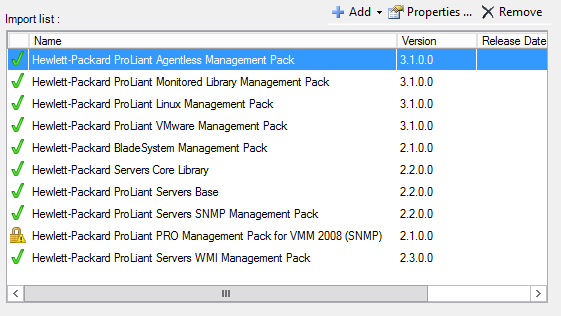
Keep in mind that new versions of the management pack for HP servers and blades will come only in this bundle Insight Control for Microsoft System Center. No separate downloads will be released. HP Storage Management Pack for now stays separate download and it is not provided in this package.
To download this new version go here. You only need to download Insight Control for System Center 7.2 DVD ISO – Mar 2013 for the System Center integration kits.
Download All Microsoft Management Packs for SCOM 2007, R2 and 2012 in Bulk with PowerShell
Just last week Daniel Savage published a list on TechNet Wiki with all management packs for OpsMgr 2007, R2 and 2012. A couple of days later Stefan Stranger wrote Finding Management Packs from Microsoft Download website using PowerShell and provided a small PowerShell script that provides a list with the management packs from that site and links to them. After reading that post I was wondering wouldn’t be cool if you get the names of all management packs and their links and download all of them with their guides also. And when you download them to be able to organize them in structure that includes the name of the MP and its version. Instead of writing to Stefan I’ve said to myself – What the hell I will try to make that script. I do not have any big experience with PowerShell and it was not easy to built the script but because I’ve managed to create this proves that PowerShell is easy to learn but you have to be persistent. During the creation of the script I’ve noticed that some of the links on the page were incorrect so I’ve corrected them.
In short the script grabs the names and the links for all management packs on the site. Than it goes trough every MP link. From every MP page gets the version of it and all download links (msi, guides and etc.). Than creates a directory for that MP and subdirectory with the version number and downloads all files in it. The script requires PowerShell v3.
Here is the script:
1: #Get list of all Management packs and their links from Technet Wiki
2: #Thanks to Stefan Stranger http://blogs.technet.com/b/stefan_stranger/archive/2013/03/13/finding-management-packs-from-microsoft-download-website-using-powershell.aspx
3: $allmpspage = Invoke-WebRequest -Uri "http://social.technet.microsoft.com/wiki/contents/articles/16174.microsoft-management-packs.aspx"
4: $mpslist = $allmpspage.Links | Where-Object {($_.href -like "*http://www.microsoft.com/*download*") -and ($_.outerText -notlike "*Link to download page*") -and ($_.InnerHTML -like "*This link*")} |
5: Select @{Label="Management Pack";Expression={$_.InnerText}}, @{Label="Download Link";Expression={$_.href}}
6:
7: #Directory to save the downloaded management packs. Make sure it is created first before running the script
8: $dirmp = "D:\MPs\"
9:
10: #go trough every MP
11: foreach ($mp in $mpslist)
12: {
13: #get MP link
14: $mplink = $mp.'Download Link'
15:
16: #get MP name
17: $mpname = $mp.'Management Pack'
18: Write-Host "MP Name:" $mpname
19: Write-Host "MP Link:" $mplink
20:
21: #Read MP page
22: $mppage = Invoke-WebRequest -Uri "$mplink"
23:
24: #Find all download links on the page (mp, guide and etc.). $_.href cannot be used beacuse some of the links require conformation before download
25: $dws = $mppage.Links | Where-Object {($_.'bi:fileurl' -like "*http://download.microsoft.com/download*") } | Select @{Label="Download Link";Expression={$_.'bi:fileurl'}}
26:
27: #Find the version number of the MP on its page
28: $version = $mppage.ParsedHtml.getElementsByTagName("td") | Where "classname" -contains "col2" | Select -ExpandProperty InnerText
29:
30: #Remove character ? in fron of MP version. For some reason some versions of mps start with ?
31: $version = $version.Replace("?","")
32:
33: #Remove / character from MP name if contains it beacuse can create unneeded directories
34: $mpname = $mpname.Replace("/","")
35: Write-Host "MP Version:" $version
36: Write-Host "Download Links:" $dws
37:
38: #Create directory with the Name of the MP and subdirecotory with the version of the MP
39: New-Item -ItemType directory -Path $dirmp\$mpname\$version
40:
41: #Get the array of found download links
42: $dws = $dws.'Download Link'
43:
44: #Get trough every download link
45: foreach ($dw in $dws)
46: {
47: #assign download link to $source variable
48: $source = $dw
49:
50: #Get the name of the file that will be downloaded
51: $Filename = [System.IO.Path]::GetFileName($source)
52:
53: #Set directory where the file to be downloaded
54: $dest = "$dirmp\$mpname\$version\$Filename"
55:
56: #initiate client for download
57: $wc = New-Object System.Net.WebClient
58:
59: #download the file and put it in the destination directory
60: $wc.DownloadFile($source, $dest)
61: }
62:
63: #empy line
64: Write-Host
65: }
You can download it from TechNet Gallery also.
Once again thanks to Stefan Stranger.
All Management Packs that Microsoft has Released for SCOM 2007 and 2012 So Far
There is a new TechNet Wiki page that has links to all management pack released by Microsoft. This is an useful page for every SCOM administrator/engineer/specialist. Check it here.
New Approach on Management Packs Started at Microsoft
MSFT announced that they will pay more attention on management packs provided by them. This new approach is to achieve better experience with management packs for SCOM. Also MSFT reveals approximate dates for Exchange 2013, BizTalk 2013, Windows Server 2012 DHCP and Windows Server 2012 DNS management packs. Read the full announcement here.
 Cloud Administrator in Azure World