
If you are using Network Virtualization from Microsoft you probably also using Multi-Tenant Gateways. In such scenario the gateways become critical part of your infrastructure and would be best if you can monitor them. Continue reading “Quick Look at Multi-Tenant RRAS Management Pack”
Category: Virtualization
Quick Tip: Pinging Provider Address in Hyper-V Network Virtualization
If you are familiar with Hyper-V Network Virtualization you know that there is the concept of Provider Addresses and they are kind of different than the normal addresses assigned for physical or virtual network adapters. Continue reading “Quick Tip: Pinging Provider Address in Hyper-V Network Virtualization”
Updated: Hybrid Cloud with NVGRE (WSSC 2012 R2) Whitepaper
Hybrid Cloud with NVGRE (WSSC 2012 R2) Whitepaper is updated here to reflect R2 RTM. Hope you will like it. Authors are Kristian Nese and Flemming Riis. Technical reviewers are Daniel Neumann and me.
SCVMM – SCOM Maintenance Mode Integration is fixed in System Center 2012 R2
Previously I’ve blogged here, here and here about SCVMM and SCOM maintenance mode integration. In the past if you put Hyper-V hosts in maintenance mode in SCVMM the corresponding SCVMM object for the host is also put in maintenance mode. The problem with this scenario is that you can get some alerts if you patch the hosts automatically or bring them completely down for other maintenance tasks. Now with System Center 2012 R2 this is no longer the case. If you put the hyper-v hosts in SCVMM in maintenance mode:

The computer object of the host is put in maintenance mode in SCOM:
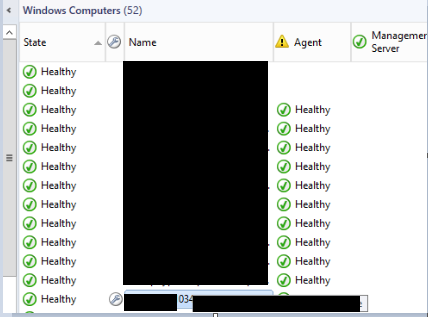
Now you can perform maintenance task on host without getting noisy alerts and we are closer to better automation.
I would like to thanks the VMM product group for listening on my feedback and for those who voted for this feature change.
Error 23317 in VMM 2012 R2 When You Try to Apply Changes on VM That is Using Shared VHDX Disk
When you try to apply some change on a virtual machine with Shared VHDX disk in Virtual Machine Manager 2012 R2 you may receive the following error:
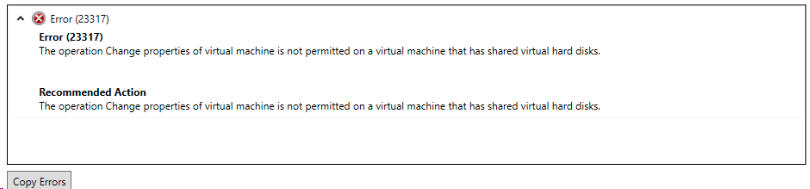
Error (23317)
The operation Change properties of virtual machines is not permitted on a virtual machine that has shared virtual hard disks.
Recommended Action
The operation Change properties of the virtual machine is not permitted on a virtual machine that has shared virtual hard disks.
Even that I was not changing anything related to the shared disks the task would fail. There is an easy fix for this and as many times it is called PowerShell. If you do not know PowerShell do not worry here are easy steps:
1. Open the Properties of the Virtual machine you want to change.
2. Make the change but do not apply.
3. In the left corner of the properties dialog box you will see View Script button. Press it.
4. A script will come up.
5. You need to take the part that is only related to your change. For example if I want to change only the classification of a network adapter I would have something like this:
$VirtualNetworkAdapter = Get-SCVirtualNetworkAdapter -Name “server1” -ID “6c733a79-4ef5-4df4-9b39-690b8ab0be46”
$VMNetwork = Get-SCVMNetwork -Name “VMetwork_Test” -ID “675245a2-c660-46d7-aee0-b8ece987e49b”
$VMSubnet = Get-SCVMSubnet -Name “VMSubnet_Test” | where {$_.VMNetwork.ID -eq “623294a2-c660-46d7-aee0-b8ece987e49b”}
$PortClassification = Get-SCPortClassification | where {$_.Name -eq “Classification1”}
Set-SCVirtualNetworkAdapter -VirtualNetworkAdapter $VirtualNetworkAdapter -VMNetwork $VMNetwork -VMSubnet $VMSubnet -VLanEnabled $true -VLanID 77 -VirtualNetwork “vSwitch” -MACAddressType Dynamic -IPv4AddressType Static -IPv6AddressType Dynamic -PortClassification $PortClassification
Basically you take that part of the generated script that is only for your change. Remove any –VMMServer property reference and any –JobGroup Property reference.
6. Open VMM PowerShell. Paste the script and you are done. Your change is applied to VM with shared virtual disks.
 Cloud Administrator in Azure World