
The long waited Service Pack 1 of System Center 2012 has reached RTM and it is now available for download on MSDN. It seems the rumors were true. This is a Christmas gift from Microsoft  .
.
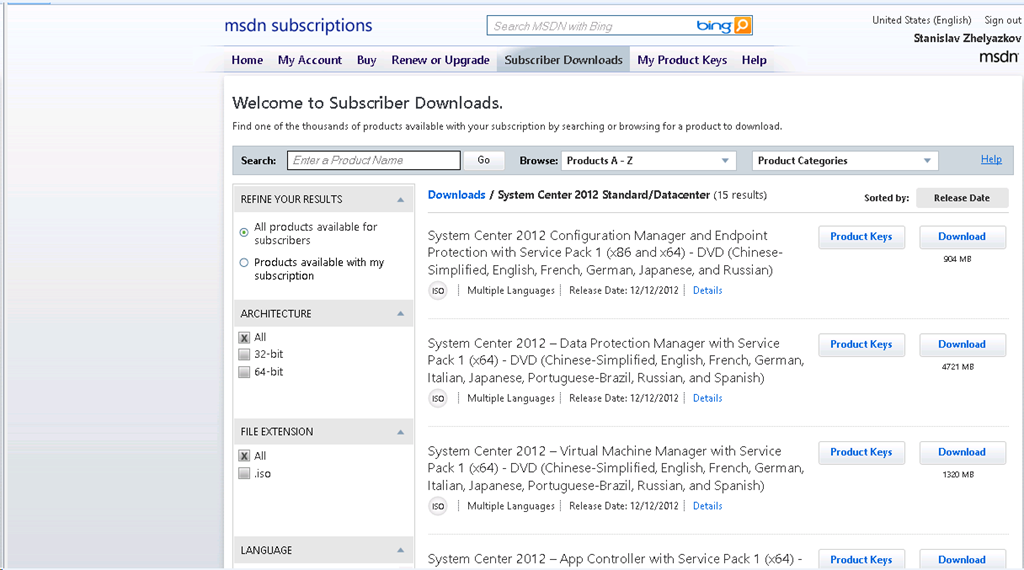
The long waited Service Pack 1 of System Center 2012 has reached RTM and it is now available for download on MSDN. It seems the rumors were true. This is a Christmas gift from Microsoft .
With System Center 2012 the different products of the family became components. This was not just changing of words. This change has the goal to tip that all components come in one license and that their integration is way better compared to the previous versions. To help us leverage that integration community project created Integration guides for System Center 2012 components:
The purpose of the Integration Guide is to provide an overview of each System Center component in its role as a programmable platform to be leveraged for the Microsoft Private Cloud. It is intended to provide an abstraction layer that guides partners and customers on their decision process for methods to build automated solutions across System Center components and between System Center and other systems.
Last week I was on course 10750A: Monitoring and Operating a Private Cloud with System Center 2012. Even though I had took the exam to that course and I am MCSE: Private Cloud already it is always useful attending such course. The course includes all System Center 2012 components with exception of SCCM 2012 with focus on System Center 2012 Service Manager and System Center 2012 Operations Manager. I was surprised to found out that most of the lab time included exercises with SCSM 2012. This was surprise because when I was taking the exam for this course most of the questions were SCOM 2012 related. Even though focus is on SCSM and SCOM 2012 all the products are represented on basic level and the whole course is like an introduction to new versions of the components. Besides introducing the new versions the course will show you how you can integrate the components and leverage that integration which can be quite useful in real world scenario. For me the course was useful because of this. I didn’t learn something new for the product but I’ve managed to try new things in the labs. As a summary I would say the the course can be useful if you are specialist in one of the components and you want to learn more about the other components and how to integrate them. If you are looking to learn advanced stuff for any of the components this course is not for you. You can always advance in your knowledge on any of the System Center components by reading articles from MVPs over Internet or by reading books for example like this one for SCOM 2012.
It seems Microsoft is working hard to provide support for System Center 2012. Even SP1 for System Center 2012 is a couple of months away we are still getting updates for System Center 2012 RTM. Update rollup 3 fixes the following issues:
Update Rollup 3 for System Center Data Protection Manager 2012 (KB2751230)
Issue 1
After you upgrade System Center Data Protection Manager 2010 to System Center Data Protection Manager 2012, the tape management report does not display overdue tapes.
Issue 2
System Center Data Protection Manager 2012 Client Protection does not scale to the limits that are expected.
Issue 3
When you try to specify a client computer name in the DPMServerName attribute by using Windows PowerShell, Windows PowerShell crashes.
Issue 4
When the name of a Microsoft SharePoint site collection contains a space, and you perform a SharePoint item-level recovery operation in System Center Data Protection Manager 2012, the operation fails.
Issue 5
After you rename a SharePoint site in System Center Data Protection Manager 2012, you cannot restore the site.
Issue 6
The SharePoint Recovery Point Status Report displays incorrect data in System Center Data Protection Manager 2012.
Issue 7
A bare metal recovery fails in certain situations.Update Rollup 3 for System Center Operations Manager 2012 (KB2750631)
Issue 1
When you use the 32-bit version of Windows Internet Explorer to start a web console, the Microsoft.EnterpriseManagement.Presentation.Controls.SpeedometerGaugeUIController controller does not work correctly.
Issue 2
When you run a Windows PowerShell cmdlet, you receive the following error message:Get-BPAModel is not recognized as the name of a cmdlet.
Issue 3
When you try to change a URL in the "web application availability monitoring" template instance, the change is not applied.Update Rollup 3 for System Center Service Manager 2012 (KB2750615)
Issue 1
When you open or close the Incident form in the System Center Service Manager 2012 console, a memory leak occurs.
Issue 2
When form control objects are rooted in the Garbage-Collected (GC) Heap, the System Center Service Manager 2012 console crashes, and you receive an OutOfMemoryException exception.
Issue 3
After you change the SharePoint site language to Turkish in the System Center Service Manager 2012 portal, the display strings are displayed in English unexpectedly.
Issue 4
When you open the System Center Service Manager 2012 console by using a Citrix application, and then you open the Incident form, you experience slow performance.
More information and download links are located here.
A couple of hours after beta of SP1 for System Center 2012 was released some additional related downloads were released:
 Cloud Administrator in Azure World