
Release several hours ago a new Management Pack for SQL Server 2012 Analysis Services. There is also a version for SQL 2008 Analysis Services. But I will focus this blog post on the 2012 version. The SQL Server Management Pack provides some monitoring for SQL Analysis Services but does not goes too deep and now with this new MP you have that option. Let’s look on how to install it and import it: Continue reading “Quick Look at the New SQL Server 2012 Analysis Services Management Pack”
Category: SQL 2012
Updated MP: SQL Server
The SQL MP which had new version just last month now is updated again. The previous release had some bugs which were addressed and fixed quickly:
- Fixed CPU Utilization Monitor
- Fixed SQL Server seed discovery for WoW64 environments
- Alert severity of Average Wait Time Monitor was changed to Warning, added consecutive sampling to reduce noise, threshold was changed to 250
- Alert severity of SQL Re-Compilation monitor was changed to Warning, threshold was changed to 25. The monitor was disabled by default.
- Minor fixes
Great job by the team behind the MP for fixing those bugs quickly. The new version you can find here.
Updated MP: SQL Server
The SQL Server MP has reached version 6.4.0.0 introducing the following changes:
- New Dashboard for SQL Server 2012 DB
- New Monitors and Rules – only for SQL 2008 and SQL 2012
- SPN monitor improved
- Support for special symbols in DB names.
- Improved AlwaysOn seed discovery
- Run As configuration changes to support Low privilege for SQL Server 2012 Cluster
- Improved performance of AlwaysOn discovery
- Custom User Policy Discovery and Monitoring performance optimization
- Hided AG health object from Diagram view
- Minor changes
o Collect DB Active Connections count
o Collect DB Active Requests count
o Collect DB Active Sessions count
o Collect DB Active Transactions count
o Collect DB Engine Thread count
o Thread Count monitor
o Transaction Log Free Space (%) monitor
o Transaction Log Free Space (%) collection
o Collect DB Engine CPU Utilization (%)
o CPU Utilization (%) monitor for DB engine
o Buffer Cache Hit Ratio monitor
o Collect DB Engine Page Life Expectancy (s)
o Page Life Expectancy monitor
o Collect DB Disk Read Latency (ms)
o Collect DB Disk Write Latency (ms)
o Disk Read Latency monitor
o Disk Write Latency monitor
o Collect DB Transactions per second count
o Collect DB Engine Average Wait Time (ms)
o Average Wait Time monitor
o Collect DB Engine Stolen Server Memory (MB)
o Stolen Server Memory monitor
o Collect DB Allocated Free Space (MB)
o Collect DB Used Space (MB)
o Collect DB Disk Free Space (MB)
o SQL Re-Compilation monitor
The information is taken directly from the guide. It seems changes in the MP are a lot especially the SQL dashboard that was waited since it was shown at MMS 2013 earlier this year. Grab the latest version from here and start implementing it first on your test and development environments.
SQL Analysis Services: “The Cluster Resource ‘Analysis Services (Instance_Name) Could Not Be Brought Up” and “No Connection Could Be Made Because The Target Machine Actively Refused it IP:Port”
If you look at the title you probably think I’ve switched to the dark side  and from System Center Specialist I’ve become SQL Specialist . Nope it is not that. If you are dealing with System Center you know the clash with SQL is inevitable. Sooner or later you have to learn a thing or two in SQL. So I’ve been playing these days with installing SQL instances for System Center on a cluster and I’ve bumped into two issues:
- The Cluster Resource ‘Analysis Services (Instance_Name) Could Not Be Brought Up
I’ve received this error during the installation of SQL instance with Analysis Services on the first node. The error is received at the end of the installation when the cluster role is being brought online.
Reason for the error: Analysis Services files during the setup are set to a location that is different than the default one. Because of that it seems permissions to the folder/s where Analysis Services are put are not set during installation.
Resolution: To all folders where Analysis Services is placed add full NTFS permissions for the Analysis Services service account.
- No Connection Could Be Made Because The Target Machine Actively Refused it IP:Port
I’ve received this error after installing SQL instance with Analysis services on the first node. In order to check if everything is OK with Analysis Services I’ve started up SQL Management Studio and tried to connect to the SSAS instance but I’ve received the error above. To troubleshoot this error I’ve tried telnet to the IP and the Port but no connection was made.
Reason for the error: SQL Analysis Services sets port 0 during the installation which means dynamic port.
Resolution. In order to be able to connect I’ve set a static port to the SSAS instance. You cannot do that trough SQL Management Studio so you have to find a file named msmdsrv.ini. This file is located in folder named Config of the root directory of where you’ve installed your SSAS instance. Open the file and edit the line <Port>0</Port> by replacing 0 with a port of your desire.
I’ve only seen these error when I have clustered instances. As you know SSAS instance can be required for SCOM or SCSM.
Solved: VMM Error with Event ID 19999 Crashes VMM Service
Recently I’ve encounter an error that was restarting the VMM service. As you know if the VMM service crashes the jobs that are currently running will fail. So I was experiencing Event ID 19999 in the VMM event log which was crashing the VMM service once or twice per day. This could be very annoying especially in a production environment where jobs are running all the time. Here is what is the exact error in VMM event log:
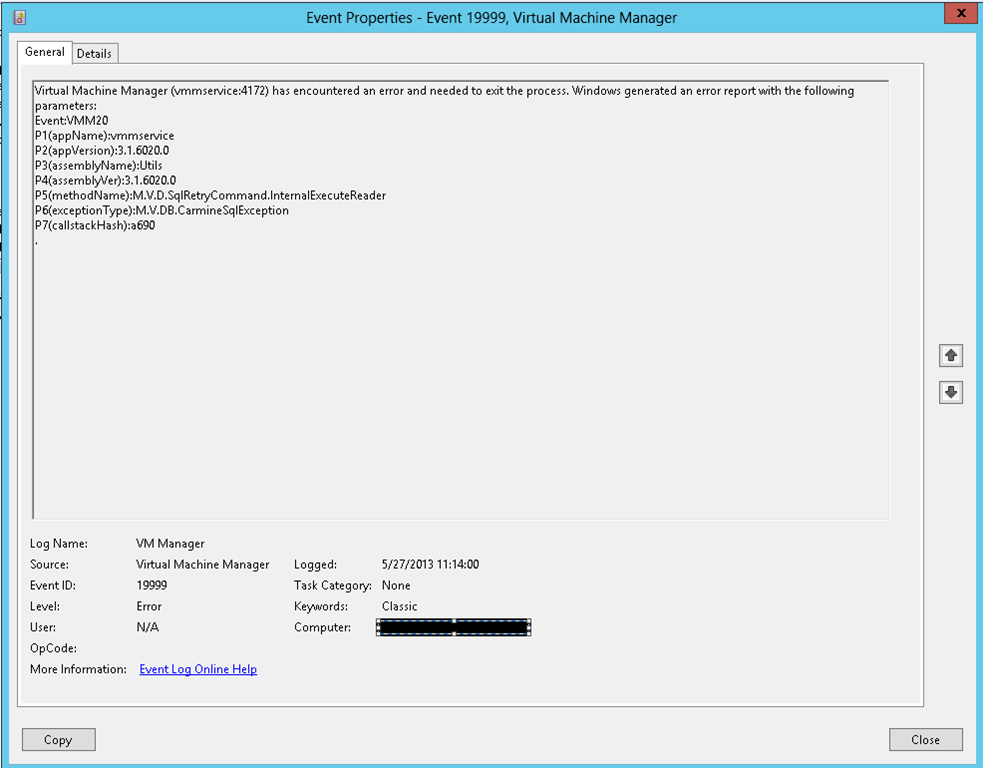
Log Name: VM Manager
Source: Virtual Machine Manager
Date: 5/27/2013 11:14:00
Event ID: 19999
Task Category: None
Level: Error
Keywords: Classic
User: N/A
Computer: vmm-server.contoso.com
Description:
Virtual Machine Manager (vmmservice:4172) has encountered an error and needed to exit the process. Windows generated an error report with the following parameters:
Event:VMM20
P1(appName):vmmservice
P2(appVersion):3.1.6020.0
P3(assemblyName):Utils
P4(assemblyVer):3.1.6020.0
P5(methodName):M.V.D.SqlRetryCommand.InternalExecuteReader
P6(exceptionType):M.V.DB.CarmineSqlException
P7(callstackHash):a690
.
When you look at the error you could not find any hint what exactly was causing the issue. Pretty nasty error so it was time for some deep troubleshooting. This could be achieved by enabling debug logging for SCVMM 2012 SP1 and it is simple and easy. It is all described in knowledge base article: http://support.microsoft.com/kb/2801185. As I couldn’t reproduce the issue at a specific time I’ve just enabled the trace for 24 hours. From time to time I’ve monitored the VMM event log to if the error has appeared. When I saw that the error appeared again I’ve stopped the trace. Remember the exact time when the error was logged in the VMM event log and started to look for something suspicious on the debug log around the same time of the error. And I’ve found the cause of the restart in the following lines:
[0]104C.1370::2013-05-27 11:14:00.909 [Microsoft-VirtualMachineManager-Debug]4,1,Catalog.cs,898,!!! System.Data.SqlClient.SqlException (0x80131904): Cannot execute as the database principal because the principal “DOMAIN\ACCOUNT” does not exist, this type of principal cannot be impersonated, or you do not have permission. at System.Data.SqlClient.SqlConnection.OnError(SqlException exception, Boolean breakConnection, Action`1 wrapCloseInAction) at System.Data.SqlClient.TdsParser.ThrowExceptionAndWarning(TdsParserStateObject stateObj, Boolean callerHasConnectionLock, Boolean asyncClose) at System.Data.SqlClient.TdsParser.TryRun(RunBehavior runBehavior, SqlCommand cmdHandler, SqlDataReader dataStream, BulkCopySimpleResultSet bulkCopyHandler, TdsParserStateObject stateObj, Boolean& dataReady) at System.Data.SqlClient.SqlDataReader.TryConsumeMetaData() at System.Data.SqlClient.SqlDataReader.get_MetaData() at System.Data.SqlClient.SqlCommand.FinishExecuteReader(SqlDataReader ds, RunBehavior runBehavior, String resetOptionsString) at System.Data.SqlClient.SqlCommand.RunExecuteReaderTds(CommandBehavior cmdBehavior, RunBehavior runBehavior, Boolean returnStream, Boolean async, Int32 timeout, Task& task, Boolean asyncWrite) at System.Data.SqlClient.SqlCommand.RunExecuteReader(CommandBehavior cmdBehavior, RunBehavior runBehavior, Boolean returnStream, String method, TaskCompletionSource`1 completion, Int32 timeout, Task& task, Boolean asyncWrite) at System.Data.SqlClient.SqlCommand.RunExecuteReader(CommandBehavior cmdBehavior, RunBehavior runBehavior, Boolean returnStream, String method) at System.Data.SqlClient.SqlCommand.ExecuteReader(CommandBehavior behavior, String method) at System.Data.SqlClient.SqlCommand.ExecuteReader(CommandBehavior behavior) at Microsoft.VirtualManager.DB.SqlRetryCommand.InternalExecuteReader() ClientConnectionId:847489e7-ea6f-47fe-807f-07cf880a5cef Error = 15517 Index #0 Source: .Net SqlClient Data Provider Number: 15517 State: 1 Class: 16 Server: vmm-server.contoso.com\VMMSQLINSTANCE,<PORT> Message: Cannot execute as the database principal because the principal “DOMAIN\ACCOUNT” does not exist, this type of principal cannot be impersonated, or you do not have permission. Procedure: prc_RBS_UserRole_GetAllByUser Line: 13 FileName:; Method:ExecuteReader(); lineNo:0; ilOffset:7. FileName:; Method:<ReadUserRolesLight>b__30(); lineNo:0; ilOffset:12. FileName:; Method:HandleReadErrors(); lineNo:0; ilOffset:8. FileName:; Method:ReadUserRolesLight(); lineNo:0; ilOffset:13. FileName:; Method:GetAllUserRoles(); lineNo:0; ilOffset:20. FileName:; Method:GetRolesForUser(); lineNo:0; ilOffset:53. FileName:; Method:.ctor(); lineNo:0; ilOffset:145. FileName:; Method:CreateMicrosoft.VirtualManager.Engine.Remoting.ClientConnection(); lineNo:0; ilOffset:-1. FileName:; Method:GetServiceInstance(); lineNo:0; ilOffset:103. FileName:; Method:EnsureServiceInstance(); lineNo:0; ilOffset:60. FileName:; Method:ProcessMessage41(); lineNo:0; ilOffset:50. FileName:; Method:ProcessMessage31(); lineNo:0; ilOffset:198. FileName:; Method:Process(); lineNo:0; ilOffset:98. FileName:; Method:DispatchAndReleasePump(); lineNo:0; ilOffset:598. FileName:; Method:HandleRequest(); lineNo:0; ilOffset:241. FileName:; Method:AsyncMessagePump(); lineNo:0; ilOffset:57. FileName:; Method:UnhandledExceptionFrame(); lineNo:0; ilOffset:0. FileName:; Method:Complete(); lineNo:0; ilOffset:194. FileName:; Method:OnReceive(); lineNo:0; ilOffset:75. FileName:; Method:UnhandledExceptionFrame(); lineNo:0; ilOffset:0. FileName:; Method:Complete(); lineNo:0; ilOffset:194. FileName:; Method:OnReceiveComplete(); lineNo:0; ilOffset:43. FileName:; Method:OnAsyncReadComplete(); lineNo:0; ilOffset:188. FileName:; Method:UnhandledExceptionFrame(); lineNo:0; ilOffset:0. FileName:; Method:Complete(); lineNo:0; ilOffset:62. FileName:; Method:ProcessFrameBody(); lineNo:0; ilOffset:112. FileName:; Method:ReadCallback(); lineNo:0; ilOffset:104. FileName:; Method:CheckCompletionBeforeNextRead(); lineNo:0; ilOffset:93. FileName:; Method:ReadCallback(); lineNo:0; ilOffset:41. FileName:; Method:Complete(); lineNo:0; ilOffset:194. FileName:; Method:OnAsyncIOComplete(); lineNo:0; ilOffset:38. FileName:; Method:OnReceiveAsync(); lineNo:0; ilOffset:87. FileName:; Method:FinishOperationSuccess(); lineNo:0; ilOffset:1483. FileName:; Method:CompletionPortCallback(); lineNo:0; ilOffset:16. FileName:; Method:PerformIOCompletionCallback(); lineNo:0; ilOffset:60. ,{00000000-0000-0000-0000-000000000000}
[0]104C.1370::2013-05-27 11:14:00.909 [Microsoft-VirtualMachineManager-Debug]4,1,Catalog.cs,950,No retry on exception System.Data.SqlClient.SqlException (0x80131904): Cannot execute as the database principal because the principal “DOMAIN\ACCOUNT” does not exist, this type of principal cannot be impersonated, or you do not have permission. at System.Data.SqlClient.SqlConnection.OnError(SqlException exception, Boolean breakConnection, Action`1 wrapCloseInAction) at System.Data.SqlClient.TdsParser.ThrowExceptionAndWarning(TdsParserStateObject stateObj, Boolean callerHasConnectionLock, Boolean asyncClose) at System.Data.SqlClient.TdsParser.TryRun(RunBehavior runBehavior, SqlCommand cmdHandler, SqlDataReader dataStream, BulkCopySimpleResultSet bulkCopyHandler, TdsParserStateObject stateObj, Boolean& dataReady) at System.Data.SqlClient.SqlDataReader.TryConsumeMetaData() at System.Data.SqlClient.SqlDataReader.get_MetaData() at System.Data.SqlClient.SqlCommand.FinishExecuteReader(SqlDataReader ds, RunBehavior runBehavior, String resetOptionsString) at System.Data.SqlClient.SqlCommand.RunExecuteReaderTds(CommandBehavior cmdBehavior, RunBehavior runBehavior, Boolean returnStream, Boolean async, Int32 timeout, Task& task, Boolean asyncWrite) at System.Data.SqlClient.SqlCommand.RunExecuteReader(CommandBehavior cmdBehavior, RunBehavior runBehavior, Boolean returnStream, String method, TaskCompletionSource`1 completion, Int32 timeout, Task& task, Boolean asyncWrite) at System.Data.SqlClient.SqlCommand.RunExecuteReader(CommandBehavior cmdBehavior, RunBehavior runBehavior, Boolean returnStream, String method) at System.Data.SqlClient.SqlCommand.ExecuteReader(CommandBehavior behavior, String method) at System.Data.SqlClient.SqlCommand.ExecuteReader(CommandBehavior behavior) at Microsoft.VirtualManager.DB.SqlRetryCommand.InternalExecuteReader() ClientConnectionId:847489e7-ea6f-47fe-807f-07cf880a5cef Error = 15517 Index #0 Source: .Net SqlClient Data Provider Number: 15517 State: 1 Class: 16 Server: vmm-server.contoso.com\VMMSQLINSTANCE,<PORT> Message: Cannot execute as the database principal because the principal “DOMAIN\ACCOUNT” does not exist, this type of principal cannot be impersonated, or you do not have permission. Procedure: prc_RBS_UserRole_GetAllByUser Line: 13 FileName:; Method:ExecuteReader(); lineNo:0; ilOffset:7. FileName:; Method:<ReadUserRolesLight>b__30(); lineNo:0; ilOffset:12. FileName:; Method:HandleReadErrors(); lineNo:0; ilOffset:8. FileName:; Method:ReadUserRolesLight(); lineNo:0; ilOffset:13. FileName:; Method:GetAllUserRoles(); lineNo:0; ilOffset:20. FileName:; Method:GetRolesForUser(); lineNo:0; ilOffset:53. FileName:; Method:.ctor(); lineNo:0; ilOffset:145. FileName:; Method:CreateMicrosoft.VirtualManager.Engine.Remoting.ClientConnection(); lineNo:0; ilOffset:-1. FileName:; Method:GetServiceInstance(); lineNo:0; ilOffset:103. FileName:; Method:EnsureServiceInstance(); lineNo:0; ilOffset:60. FileName:; Method:ProcessMessage41(); lineNo:0; ilOffset:50. FileName:; Method:ProcessMessage31(); lineNo:0; ilOffset:198. FileName:; Method:Process(); lineNo:0; ilOffset:98. FileName:; Method:DispatchAndReleasePump(); lineNo:0; ilOffset:598. FileName:; Method:HandleRequest(); lineNo:0; ilOffset:241. FileName:; Method:AsyncMessagePump(); lineNo:0; ilOffset:57. FileName:; Method:UnhandledExceptionFrame(); lineNo:0; ilOffset:0. FileName:; Method:Complete(); lineNo:0; ilOffset:194. FileName:; Method:OnReceive(); lineNo:0; ilOffset:75. FileName:; Method:UnhandledExceptionFrame(); lineNo:0; ilOffset:0. FileName:; Method:Complete(); lineNo:0; ilOffset:194. FileName:; Method:OnReceiveComplete(); lineNo:0; ilOffset:43. FileName:; Method:OnAsyncReadComplete(); lineNo:0; ilOffset:188. FileName:; Method:UnhandledExceptionFrame(); lineNo:0; ilOffset:0. FileName:; Method:Complete(); lineNo:0; ilOffset:62. FileName:; Method:ProcessFrameBody(); lineNo:0; ilOffset:112. FileName:; Method:ReadCallback(); lineNo:0; ilOffset:104. FileName:; Method:CheckCompletionBeforeNextRead(); lineNo:0; ilOffset:93. FileName:; Method:ReadCallback(); lineNo:0; ilOffset:41. FileName:; Method:Complete(); lineNo:0; ilOffset:194. FileName:; Method:OnAsyncIOComplete(); lineNo:0; ilOffset:38. FileName:; Method:OnReceiveAsync(); lineNo:0; ilOffset:87. FileName:; Method:FinishOperationSuccess(); lineNo:0; ilOffset:1483. FileName:; Method:CompletionPortCallback(); lineNo:0; ilOffset:16. FileName:; Method:PerformIOCompletionCallback(); lineNo:0; ilOffset:60. ,{00000000-0000-0000-0000-000000000000}
[0]104C.1370::2013-05-27 11:14:00.919 [Microsoft-VirtualMachineManager-Debug]4,2,ServiceHost.cs,103,Entering ServiceHost.Abort(),{00000000-0000-0000-0000-000000000000}
[0]104C.1370::2013-05-27 11:14:00.919 [Microsoft-VirtualMachineManager-Debug]4,2,ServiceHost.cs,107,Aborting service…,{00000000-0000-0000-0000-000000000000}
[0]104C.1370::2013-05-27 11:14:00.920 [Microsoft-VirtualMachineManager-Debug]18,2,ClientConnection.cs,110,Closing client connection: uuid:28e20707-2e11-4765-a801-825a15287e37;id=1,{00000000-0000-0000-0000-000000000000}
The text in blue are values that will be different in your environment. The text in red is the reason why the VMM service was restarting and the text in green shows the restarting of the VMM service.
The account that was causing this was my Operations Manager account that I was using for SCOM-VMM integration. This is the same account that I use for Default Action Account in SCOM. It has all the needed rights and even has SA rights on the SQL instance where VMM database is located. Integration with VMM and monitoring was also working without errors. But even with such rights this account was giving an error that cannot logon to the VMM database.
The first thing that I’ve tried is to remove the SCOM-VMM integration and than create it again. I’ve done it but the error was still occurring and the VMM service was restarting.
The second thing I’ve done is to logon on the SQL instance where VMM database is and add the account in question to the security in SQL with rights to login.
After my second solution I’ve been running my VMM server more than 24 hours and the error still hasn’t appear.
Update 1: I’ve spoke to early and my second solution also didn’t worked. I am working on resolving it and will post a solution as soon as I have success.
Update 2: I think I’ve finally found a solution as since my last actions I haven’t gotten the error and this was 3 days ago. So here are the actions that I have done:
1. Removed the VMM – SCOM integration from VMM.
2. Created a new account for the SCOM – VMM integration. Even though I am creating a new account the cause of the issue is not in the account.
3. Removed the VMM Run As account from SCOM. If you remove the integration from VMM the Run As account is not deleted. In fact if you create the integration with new account in SCOM the Run As account stays the same that was entered during the first creation of the integration.
4. Gave the new account appropriate permissions – member of Administrator role in VMM.
5. Created the SCOM-VMM integration again with the new account.
If you stumble upon on this issue I hope these steps will help you.
Software I’ve used:
- Windows Server 2012
- SCVMM 2012 SP1 UR2
- SCOM 2012 SP1 UR2
- SQL 2012 SP1
 Cloud Administrator in Azure World